

Demonstration Database
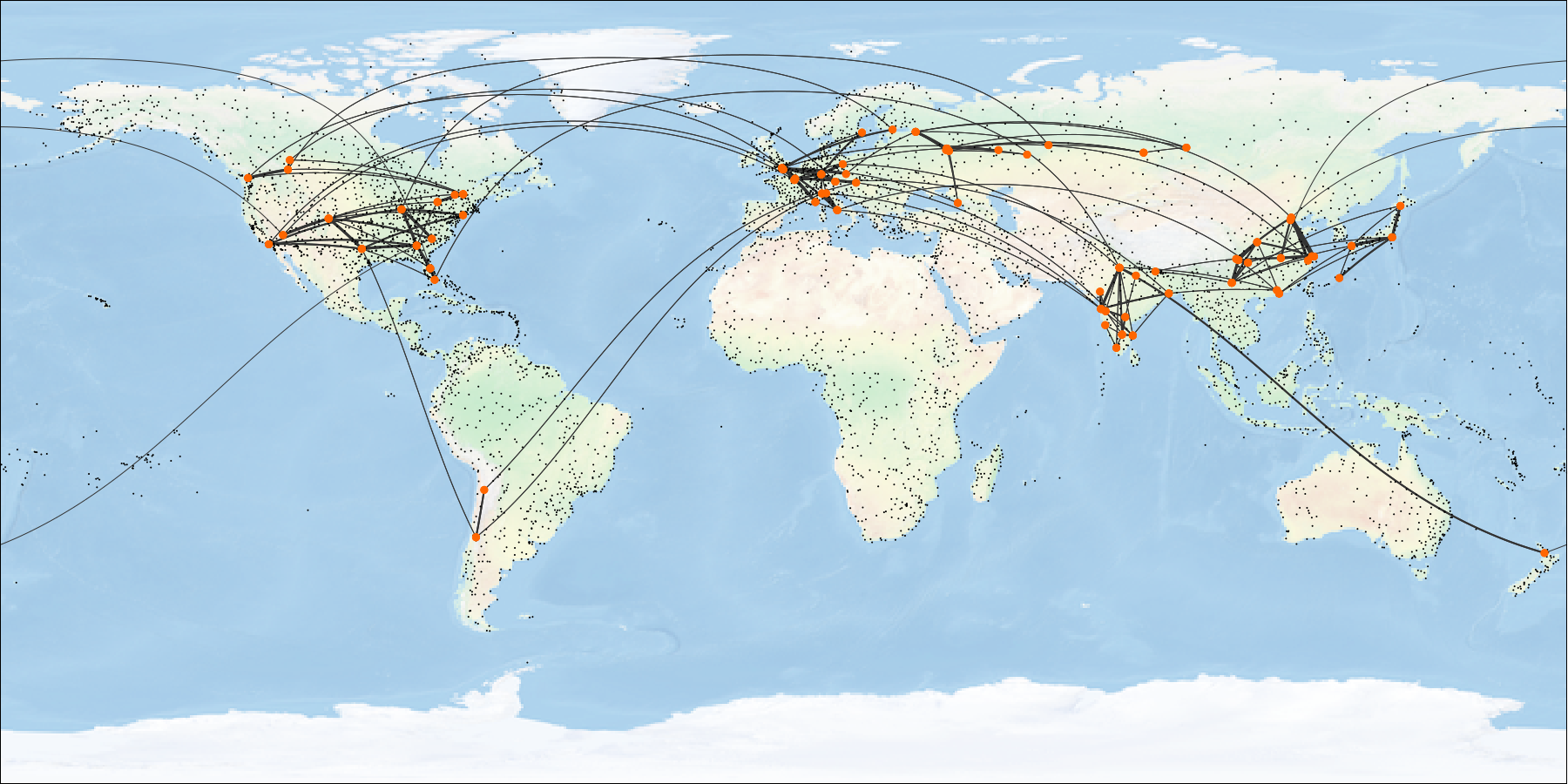
Our team offers a free demo database for PostgreSQL. The subject field of this database is airline flights worldwide.
You can use this database for various purposes, such as:
- Learning SQL language on your own
- Creating books, manuals, and courses on SQL
- Showing PostgreSQL features in articles and blogposts
When developing this demo database, we pursued several goals:
- Database schema must be simple enough to be understood without extra explanations.
- At the same time, database schema must be complex enough to allow writing meaningful queries.
- The database must contain true-to-life data that will be interesting to work with.
This demo database is distributed under the MIT license.
Please address your comments and suggestions to edu@postgrespro.ru.
01.09.2025 version
Previous 15.08.2017 version (Russia-only flights) can be found here.
Installation
The demo database is available in four flavors, which differ only in the data size:
- demo-20250901-3m.sql.gz (133 MB) — flight data for three months (DB size is about 1.3 GB)
- demo-20250901-6m.sql.gz (276 MB) — flight data for six months (DB size is about 2.7 GB)
- demo-20250901-1y.sql.gz (558 MB) — flight data for 1 year (DB size is about 5.4 GB)
- demo-20250901-2y.sql.gz (1137 MB) — flight data for two years (DB size is about 11 GB)
The small database is good for writing queries, and it will not take up much disk space. The large database can help you understand the query behavior on large data volumes and consider query optimization.
The files include an SQL script that creates the demo database and fills it with data (virtually, it is a backup copy created with the pg_dump utility). The owner of the demo database will be the DBMS user who runs the script. For example, to create the small database, run the script as the user postgres by means of psql:
gunzip -c demo-20250901-3m.sql.gz | psql -U postgresNote that if the demo database already exists, it will be deleted and recreated!
Supported versions are PostgreSQL 15 and later.
You can create your own database version with the generator.
Schema
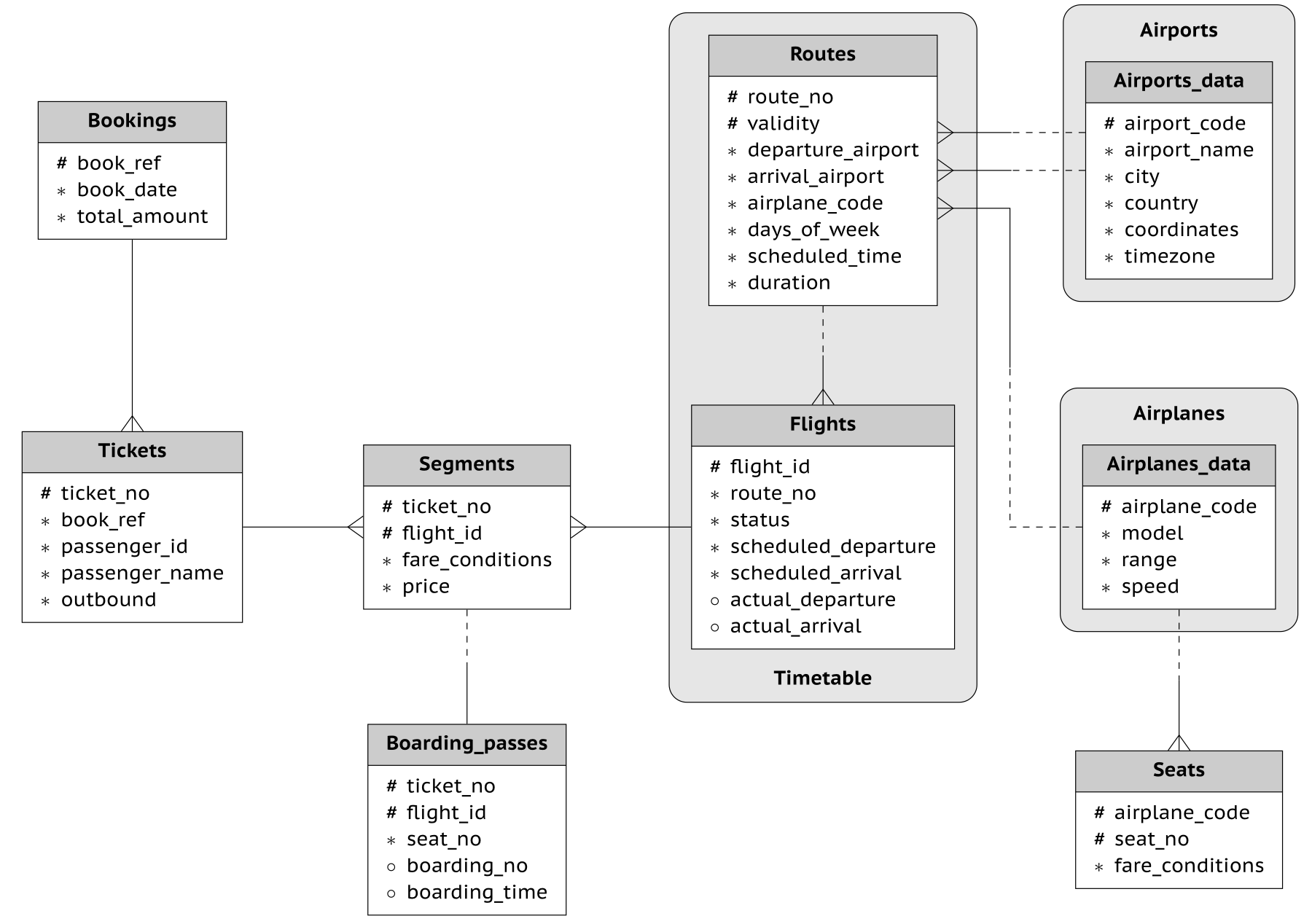
The main entity is a booking (bookings).
One booking can include several passengers, with a separate ticket (tickets) issued to each passenger for one-way trip and a separate return ticket for the round trip. A ticket has a unique number and includes information about the passenger. As such, a passenger is not a separate entity, nevertheless the document number uniquely identifies the passenger.
The ticket includes one or more flight segments (segments). Several flight segments can be included into a single ticket if there are no non-stop flights between the points of departure and destination (connecting flights). Although there is no constraint in the schema, it is assumed that all tickets in the booking have the same flight segments.
Each route (routes) goes from one airport (airports) to another. Flights (flights) with the same route number have the same points of departure and destination, but differ in departure date. The routing map is updated once per month, therefore the flights and routes are linked with the temporal foreign key. When joining, mind not only the route number, but also the departure time that must fit within the route validity period. To simplify your queries, use the timetable view that hides this join.
All flights are connecting flights: at the first flight check-in, the passenger is issued boarding passes (boarding_passes), for all flights in his ticket, where the seat number and boarding time are specified. The passenger can check in for the flight only if this flight is included into the ticket. The flight-seat combination must be unique to avoid issuing two boarding passes for the same seat.
The number of seats (seats) in the airplane and their distribution between different travel classes depends on the model of the airplane (airplanes) performing the flight. It is assumed that every airplane model has only one cabin configuration. Database schema does not check that seat numbers in boarding passes have the corresponding seats in the airplane (such verification can be done using table triggers, or at the application level).
Schema Objects
All objects of the demo database are created in schema bookings:
       Name                 |     Type      |       Description
----------------------------+---------------+-------------------------
 airplanes                  | view          | Airplane
 airplanes_data             | table         | Airplane (translations)
 airports                   | view          | Airports
 airports_data              | table         | Airports (translations)
 boarding_passes            | table         | Boarding passes
 bookings                   | table         | Bookings
 flights                    | table         | Flights
 flights_flight_id_seq      | sequence      | Flights
 routes                     | table         | Routes
 seats                      | table         | Seats
 segments                   | table         | Flights
 ticket                     | table         | Tickets
 timetable                  | view          | Timetable
When connecting to the base, the search_path configuration parameter is set to bookings,"$user",public, thus specifying the schema name is not required, unless you work with the bookings.now and bookings.version functions.
View bookings.airplanes
Each airplane model is identified by its three-digit code (airplane_code). The view also includes the name of the airplane model (model), the maximal flying distance, in kilometers (range), and the cruise speed, in kilometers per hour (speed).
The value of the model field is selected according to the chosen language (bookings.lang parameter).
    Column     |  Type   | Modifiers    |             Description
---------------+---------+--------------+-----------------------------------
 airplane_code | char(3) | not null     | Airplane code, IATA
 model         | text    | not null     | Airplane model
 range         | integer | not null     | Maximal flying distance, km
 speed         | integer | not null     | Cruise speed, km/h
View definition:
SELECT airplane_code,
    model ->> lang() AS model,
    range,
    speed
   FROM airplanes_data ml;
Table bookings.airplanes_data
This is the base table for the airplanes view. The model field of this table contains translations of airplane models to different languages, in the JSONB format. In most cases, this table is not supposed to be used directly.
    Column     |  Type   | Modifiers    |             Description
---------------+---------+--------------+-----------------------------------
 airplane_code | char(3) | not null     | Airplane code, IATA
 model         | jsonb   | not null     | Airplane model
 range         | integer | not null     | Maximal flying distance, km
 speed         | integer | not null     | Cruise speed, km/h
Indexes:
    PRIMARY KEY, btree (airplane_code)
Check constraints:
    CHECK (range > 0)
    CHECK (speed > 0)
Referenced by:
   TABLE "routes" FOREIGN KEY (airplane_code)
        REFERENCES airplanes_data(airplane_code)
    TABLE "seats" FOREIGN KEY (airplane_code)
        REFERENCES airplanes_data(airplane_code) ON DELETE CASCADE
View bookings.airports
An airport is identified by a three-letter code (airport_code) and has a name (airport_name).
There is no separate entity for the city or country, but there is a city name (city) and country name (country) to identify the airports of the same city or country. The view also includes coordinates (coordinates) and the time zone (timezone).
The values of the airport_name, city, and country fields are selected according to the chosen language (bookings.lang parameter).
   Column     |  Type   | Modifiers    |                 Description
--------------+---------+--------------+--------------------------------------------
 airport_code | char(3) | not null     | Airport code
 airport_name | text    | not null     | Airport name
 city         | text    | not null     | City
 country      | text    | not null     | Country
 coordinates  | point   | not null     | Airport coordinates (longitude and latitude)
 timezone     | text    | not null     | Airport time zone
View definition:
SELECT airport_code,
    airport_name ->> lang() AS airport_name,
    city ->> lang() AS city,
    country ->> lang() AS country,
    coordinates,
    timezone
   FROM airports_data ml;
Table bookings.airports_data
This is the base table for the airports view. This table contains translations of airport_name, city, and country values to different languages, in the JSONB format. In most cases, this table is not supposed to be used directly.
   Column     |  Type   | Modifiers    |                 Description
--------------+---------+--------------+--------------------------------------------
 airport_code | char(3) | not null     | Airport code
 airport_name | jsonb   | not null     | Airport name
 city         | jsonb   | not null     | City
 country      | jsonb   | not null     | Country
 coordinates  | point   | not null     | Airport coordinates (longitude and latitude)
 timezone     | text    | not null     | Airport time zone
Indexes:
    PRIMARY KEY, btree (airport_code)
Referenced by:
    TABLE "routes" FOREIGN KEY (arrival_airport)
        REFERENCES airports_data(airport_code)
    TABLE "routes" FOREIGN KEY (departure_airport)
        REFERENCES airports_data(airport_code)
Table bookings.boarding_passes
At the time of the first flight check-in, which opens twenty-four hours before the scheduled departure, the passenger is issued the boarding passes for all flights in the ticket. The boarding pass specifies the seat number (seat_no). Like the flight segment, the boarding pass is identified by the ticket number and the flight number.
Boarding passes are assigned sequential numbers (boarding_no), in the order of boarding (this number is unique only within the context of a particular flight) and have the boarding time recorded on them (boarding_time).
   Column          |    Type    | Modifiers    |         Description
-------------------+------------+--------------+--------------------------
 ticket_no         | text       | not null     | Ticket number
 flight_id         | integer    | not null     | Flight ID
 seat_no           | text       | not null     | Seat number
 boarding_no       | integer    | not null     | Boarding pass number
 boarding_time     | timestamptz| not null     | Boarding time
Indexes:
    PRIMARY KEY, btree (ticket_no, flight_id)
    UNIQUE CONSTRAINT, btree (flight_id, boarding_no)
    UNIQUE CONSTRAINT, btree (flight_id, seat_no)
Foreign-key constraints:
    FOREIGN KEY (ticket_no, flight_id)
        REFERENCES segments(ticket_no, flight_id)
Table bookings.bookings
The tickets start selling 60 days prior to the flight. Passengers book tickets for themselves, and, possibly, for several other passengers, in advance (book_date). The booking is identified by its number (book_ref, a six-position combination of letters and digits).
The total_amount field stores the total cost of all tickets included into the booking, for all passengers.
    Column     |      Type     | Modifiers    |         Description
--------------+---------------+--------------+---------------------------
 book_ref     | char(6)       | not null     | Booking number
 book_date    | timestamptz   | not null     | Booking date
 total_amount | numeric(10,2) | not null     | Total booking cost
Indexes:
    PRIMARY KEY, btree (book_ref)
Referenced by:
    TABLE "tickets" FOREIGN KEY (book_ref) REFERENCES bookings(book_ref)
Table bookings.flights
The natural key of the flights table consists of two fields — route_no and scheduled_departure. To make foreign keys for this table more compact, a surrogate key is used as the primary key (flight_id).
Each flight has a scheduled date and time of departure (scheduled_departure) and arrival (scheduled_arrival). The actual departure time (actual_departure) and arrival time (actual_arrival) can differ: the difference is usually not very big, but sometimes can be up to several hours if the flight is delayed.
Flight status (status) can take one of the following values:
Scheduled. The flight is available for booking. It happens 60 days before the planned departure date; before that time, there is no entry for this flight in the database.On Time. The flight is open for check-in (in twenty-four hours before the scheduled departure) and is not delayed.Delayed. The flight is open for check-in (in twenty-four hours before the scheduled departure) but is delayed.Boarding. The boarding is in process.Departed. The airplane has already departed and is airborne.Arrived. The airplane has reached the point of destination.Cancelled. The flight is cancelled.
        Column       |     Type    | Modifiers    |         Description
---------------------+-------------+--------------+-----------------------------
 flight_id           | integer     | not null     | Flight ID
 route_no            | text        | not null     | Route number
 status              | text        | not null     | Flight status
 scheduled_departure | timestamptz | not null     | Scheduled departure time
 scheduled_arrival   | timestamptz | not null     | Scheduled arrival time
 actual_departure    | timestamptz |              | Actual departure time
 actual_arrival      | timestamptz |              | Actual arrival time
Indexes:
   PRIMARY KEY, btree (flight_id)
    UNIQUE CONSTRAINT, btree (route_no, scheduled_departure)
Check constraints:
     CHECK (scheduled_arrival > scheduled_departure)
    CHECK (actual_arrival IS NULL
       OR  ((actual_departure IS NOT NULL AND actual_arrival IS NOT NULL)
            AND (actual_arrival > actual_departure)))
    CHECK (status IN ( 'Scheduled', 'On Time', 'Delayed', 'Boarding',
                      'Departed', 'Arrived', 'Cancelled'))
Referenced by:
       TABLE "segments" FOREIGN KEY (flight_id)
        REFERENCES flights(flight_id)
Table bookings.routes
A route always connects two points — the airport of departure (departure_airport) and arrival (arrival_airport). There is no such entity as an “indirect route”: if there are no non-stop flights from one airport to another, the ticket simply includes several required flight segments.
The route has a validity window (validity) of one month. The same route may operate multiple times between the same airports, with the same route_no but different airplanes and departure dates.
The flights following this route have a specific airplane model (airplane_code), the same departure time (scheduled_time, local time of the departure airport), and different days of the week (the days_of_week array, with 1 being Monday and 7 being Sunday).
        Column       |   Type      |                   |   Description
 --------------------+-------------+-------------------+-----------------------------
 route_no            | text        | not null          | Route number
 validity            | tstzrange   | not null          | Validity interval
 departure_airport   | char(3)     | not null          | Departure airport code
 arrival_airport     | char(3)     | not null          | Arrival airport code
 airplane_code       | char(3)     | not null          | Airplane code, IATA
 days_of_week        | integer[]   | not null          | Days of the week on which flights are performed
 scheduled_time      | time        | not null          | Local scheduled departure time
 duration            | interval    | not null          | Flight duration
Indexes:
    btree (departure_airport, lower(validity))
    EXCLUDE USING gist (route_no WITH =, validity WITH &&)
Foreign-key constraints:
    FOREIGN KEY (airplane_code) REFERENCES airplanes_data(airplane_code)
    FOREIGN KEY (arrival_airport) REFERENCES airports_data(airport_code)
    FOREIGN KEY (departure_airport) REFERENCES airports_data(airport_code)
Table bookings.seats
Seats define the cabin configuration of each airplane model. Each seat is defined by its number (seat_no) and has an assigned travel class (fare_conditions): Economy, Comfort or Business.
      Column     |     Type    | Modifiers    |      Description
-----------------+-------------+--------------+--------------------
 airplane_code   | char(3)     | not null     | Airplane code, IATA
 seat_no         | text        | not null     | Seat number
 fare_conditions | text        | not null     | Travel class
Indexes:
    PRIMARY KEY, btree (airplane_code, seat_no)
Check constraints:
    CHECK (fare_conditions IN ('Economy', 'Comfort', 'Business'))
Foreign-key constraints:
    FOREIGN KEY (airplane_code)
        REFERENCES airplanes(airplane_code) ON DELETE CASCADE
Table bookings.segments
A flight segment connects a ticket with a flight and is identified by their numbers.
Each segment has its cost (price) and travel class (fare_conditions).
     Column      |     Type      | Modifiers    |    Description
-----------------+---------------+--------------+---------------------
 ticket_no       | text          | not null     | Ticket number
 flight_id       | integer       | not null     | Flight ID
 fare_conditions | text          | not null     | Travel class
 price           | numeric(10,2) | not null     | Travel cost
Indexes:
    PRIMARY KEY, btree (ticket_no, flight_id)
    btree (flight_id)
Check constraints:
    CHECK (price >= 0)
    CHECK (fare_conditions IN ('Economy', 'Comfort', 'Business'))
Foreign-key constraints:
    FOREIGN KEY (flight_id) REFERENCES flights(flight_id)
    FOREIGN KEY (ticket_no) REFERENCES tickets(ticket_no)
Referenced by:
    TABLE "boarding_passes" FOREIGN KEY (ticket_no, flight_id)
        REFERENCES segments(ticket_no, flight_id)
Table bookings.tickets
A ticket has a unique number (ticket_no) that consists of 13 digits.
The ticket includes a passenger ID (passenger_id) — the identity document number based on the country code and a digital ID, and their first and last names (passenger_name) in this specific order.
It is guaranteed that a single passenger_id always corresponds to one passenger_name. A passenger cannot be included in a booking several times and cannot take overlapping flights, although the latter is not checked by the database schema.
The outbound field has the true value for the outbound flights and false for the return flights. The end points of outbound and return flights are the same, although the routes may differ.
     Column     |     Type    | Modifiers    |          Description
----------------+-------------+--------------+-----------------------------
 ticket_no      | text        | not null     | Ticket number
 book_ref       | char(6)     | not null     | Booking number
 passenger_id   | text        | not null     | Passenger ID
 passenger_name | text        | not null     | Passenger name
 outbound       | boolean     | not null     | Is the flight outbound
Indexes:
    PRIMARY KEY, btree (ticket_no)
    UNIQUE CONSTRAINT, btree (book_ref, passenger_id, outbound)
Foreign-key constraints:
    FOREIGN KEY (book_ref) REFERENCES bookings(book_ref)
Referenced by:
    TABLE "segments" FOREIGN KEY (ticket_no) REFERENCES tickets(ticket_no)
View bookings.timetable
There is a timetable view over the flights and routes tables, which hides the temporal join. Note that using this view, although simplifies many queries, may decrease performance due to excessive joins with airports tables.
          Column           |    Type     |              Description
---------------------------+-------------+--------------------------------------
 flight_id                 | integer     | Flight ID
 route_no                  | text        | Route number
 departure_airport         | char(3)     | Departure airport code
 arrival_airport           | char(3)     | Arrival airport code
 status                    | text        | Flight status
 airplane_code             | char(3)     | Airplane code, IATA
 scheduled_departure       | timestamptz | Scheduled departure time
 scheduled_departure_local | timestamp   | Scheduled departure time,
                           |             | local time at the point of departure
 actual_departure          | timestamptz | Actual departure time
 actual_departure_local    | timestamp   | Actual departure time,
                           |             | local time at the point of departure
 scheduled_arrival         | timestamptz | Scheduled arrival time
 scheduled_arrival_local   | timestamp   | Scheduled arrival time,
                           |             | local time at the point of destination
 actual_arrival            | timestamptz | Actual arrival time
 actual_arrival_local      | timestamp   | Actual arrival time,
                           |             | local time at the point of destination
View definition:
    SELECT f.flight_id,
    f.route_no,
    r.departure_airport,
    r.arrival_airport,
    f.status,
    r.airplane_code,
    f.scheduled_departure,
    (f.scheduled_departure AT TIME ZONE dep.timezone) AS scheduled_departure_local,
    f.actual_departure,
    (f.actual_departure AT TIME ZONE dep.timezone) AS actual_departure_local,
    f.scheduled_arrival,
    (f.scheduled_arrival AT TIME ZONE arr.timezone) AS scheduled_arrival_local,
    f.actual_arrival,
    (f.actual_arrival AT TIME ZONE arr.timezone) AS actual_arrival_local
   FROM flights f
     JOIN routes r ON r.flight_no = f.flight_no AND r.validity @> f.scheduled_departure
     JOIN airports_data dep ON dep.airport_code = r.departure_airport
     JOIN airports_data arr ON arr.airport_code = r.arrival_airport;
Function bookings.now
The demo database contains a snapshot of data — similar to a backup of a real system captured at some point in time. For example, if a flight has the Departed status, it means that the airplane had already departed and was airborne at the time of the backup copy.
The snapshot time is saved in the bookings.now function. You can use this function in demo queries for cases where you would use the now function in a live database.
Function bookings.version
The bookings.version function returns the demo DB version. The version consists of the name of the virtual airline and the date of the first flight for the specified time interval. The latest version is PostgresPro 2025-09-01.
Function bookings.lang
Some fields in the demo database are available in English and Russian. The bookings.lang function returns the value of the bookings.lang parameter, that is, the language in which these fields will be displayed.
This function is used in the airplanes and airports views and is not intended to be used directly in queries.
Usage
To better understand the contents of the demo database, let’s take a look at the results of several simple queries.
The results displayed below were received on a small database version PostgresPro 2025-09-01 (91 days). If the same queries return different data on your system, check your demo database version (using the bookings.version function). Some minor deviations may be caused by the difference between your local time and Moscow time, or your locale settings.
All flights are operated by several types of airplanes:
SELECT * FROM airplanes; airplane_code | model | range | speed
---------------+------------------------+-------+-------
32N | Airbus A320neo | 6500 | 830
339 | Airbus A330-900neo | 13300 | 870
351 | Airbus A350-1000 | 16700 | 913
35X | Airbus A350F | 8700 | 903
76F | Boeing 767-300F | 6000 | 850
77W | Boeing 777-300ER | 14600 | 905
789 | Boeing 787-9 Dreamliner | 14000 | 913
7M7 | Boeing 737 MAX 7 | 7000 | 840
CR7 | Bombardier CRJ700 | 3100 | 829
E70 | Embraer E170 | 4000 | 800
(10 rows)For each airplane type, a separate list of seats is supported. For example, in Embraer E170 business class, one can select the following seats:
SELECT *
FROM seats
WHERE airplane_code = 'E70' AND fare_conditions = 'Business';
 airplane_code | seat_no | fare_conditions
---------------+---------+-----------------
 E70           | 1A      | Business
 E70           | 1C      | Business
 E70           | 1D      | Business
 E70           | 2A      | Business
 E70           | 2C      | Business
 E70           | 2D      | Business
(6 rows)
Bigger airplanes have more seats of various travel classes:
SELECT
    s.airplane_code,
    string_agg (s.fare_conditions || '(' || s.num || ')', ', ') AS fare_conditions
FROM (
        SELECT airplane_code, fare_conditions, count(*)::text AS num
        FROM seats
        GROUP BY airplane_code, fare_conditions
     ) s
GROUP BY s.airplane_code
ORDER BY s.airplane_code;
airplane_code | fare_conditions
---------------+-----------------------------------------
32N | Business(28), Economy(138)
339 | Business(29), Economy(224), Comfort(28)
351 | Economy(281), Business(44)
77W | Economy(326), Business(30), Comfort(48)
789 | Economy(188), Business(48), Comfort(21)
7M7 | Business(16), Economy(144)
CR7 | Business(6), Economy(52), Comfort(12)
E70 | Business(6), Economy(72)
(8 rows)Airbus A350F and Boeing 767-300F are cargo modifications and are not serving routes.
The demo database contains the list of airports of almost all major airports. Most cities have only one airport.
SELECT
    count(*) airports,
    count(distinct country||','||city) cities,
    count(distinct country) countries
FROM airports;
airports | cities | countries
----------+--------+-----------
5501 | 5157 | 230
(1 row)For example, Moscow has five airports:
SELECT airport_code, airport_name, coordinates, timezone
FROM airports
WHERE country = 'Russia' AND city = 'Moscow';
airport_code | airport_name | coordinates | timezone
--------------+--------------+-------------------+---------------
BKA | Bykovo | (38.06,55.6172) | Europe/Moscow
DME | Domodedovo | (37.9063,55.4088) | Europe/Moscow
OSF | Ostafyevo | (37.5072,55.5117) | Europe/Moscow
SVO | Sheremetyevo | (37.4146,55.9726) | Europe/Moscow
VKO | Vnukovo | (37.2615,55.5915) | Europe/Moscow
(5 rows)The routing map is stored in the routes table. For example, here are the destinations where you can get from Rome on November, 1, 2025:
SELECT r.route_no, a.airport_code, a.airport_name, a.city, a.country, r.days_of_week, r.duration
FROM routes r
    JOIN airports a ON a.airport_code = r.arrival_airport
WHERE departure_airport = (SELECT airport_code FROM airports WHERE airport_name = 'Fiumicino')
    AND validity @> '2025-11-01 00:00:00CET'::timestamptz;
route_no | airport_code | airport_name | city | country | days_of_week | duration
----------+--------------+--------------+----------+---------------+-----------------+----------
PG0086 | BGY | Bergamo | Milan | Italy | {1,2,3,4,5,6,7} | 01:05:00
PG0176 | ORY | Orly | Paris | France | {2,4,6,7} | 01:55:00
PG0228 | HGH | Xiaoshan | Hangzhou | China | {7} | 11:30:00
PG0233 | MXP | Malpensa | Milan | Italy | {1,2,3,4,5,6,7} | 01:05:00
PG0235 | ORD | O'Hare | Chicago | United States | {2} | 09:50:00
(5 rows)Mind that the timezone is CET, Central European Time.
The database was formed at the moment returned by the bookings.now function:
SELECT bookings.now(); now
------------------------
2025-12-01 00:00:00+03
(1 row)In relation to this moment, all flights are classified as past and future flights:
SELECT
    status,
    count(*) AS count,
    min(scheduled_departure) AS min_scheduled_departure,
    max(scheduled_departure) AS max_scheduled_departure
FROM flights
GROUP BY status
ORDER BY min_scheduled_departure;
status | count | min_scheduled_departure | max_scheduled_departure
-----------+-------+-------------------------+-------------------------
Arrived | 10966 | 2025-10-01 03:00:00+03 | 2025-12-01 02:10:00+03
Cancelled | 121 | 2025-10-01 15:25:00+03 | 2026-01-29 19:20:00+03
Departed | 20 | 2025-11-30 15:50:00+03 | 2025-12-01 02:50:00+03
Boarding | 4 | 2025-12-01 02:55:00+03 | 2025-12-01 03:25:00+03
Delayed | 10 | 2025-12-01 03:30:00+03 | 2025-12-02 01:00:00+03
On Time | 157 | 2025-12-01 03:35:00+03 | 2025-12-02 02:55:00+03
Scheduled | 10480 | 2025-12-02 03:10:00+03 | 2026-01-30 02:55:00+03
(7 rows)Let’s find the next flight from Yekaterinburg (SVX airport) to Wuhan (WUH airport). Let’s use the timetable view to avoid joining flights and routes tables:
SELECT *
FROM timetable t
WHERE t.departure_airport = 'SVX'
  AND t.arrival_airport = 'WUH'
  AND t.scheduled_departure > bookings.now()
ORDER BY t.scheduled_departure
LIMIT 1 \gx
-[ RECORD 1 ]-------------+-----------------------
flight_id | 11465
route_no | PG0522
departure_airport | SVX
arrival_airport | WUH
status | Scheduled
airplane_code | 7M7
scheduled_departure | 2025-12-03 10:30:00+03
scheduled_departure_local | 2025-12-03 12:30:00
actual_departure |
actual_departure_local |
scheduled_arrival | 2025-12-03 17:30:00+03
scheduled_arrival_local | 2025-12-03 22:30:00
actual_arrival |
actual_arrival_local |Mind that two types of time are presented: local (Moscow) time and local time of the destination airport.
Each booking can include several tickets, one for each passenger. The ticket, in its turn, can include several flight segments. The complete information about the booking is stored in three tables: bookings, tickets, and segments.
Let’s take a look at the booking with code JU35I4:
SELECT * FROM bookings WHERE book_ref = 'JU35I4'; book_ref | book_date | total_amount
----------+-------------------------------+--------------
JU35I4 | 2025-10-09 06:53:16.710703+03 | 86750.00
(1 row)It contains the following tickets:
SELECT *
FROM tickets
WHERE book_ref = 'JU35I4';
ticket_no | book_ref | passenger_id | passenger_name | outbound
---------------+----------+------------------+-------------------+----------
0005433348362 | JU35I4 | RU 2714075620824 | Nadezhda Sergeeva | t
0005433348356 | JU35I4 | RU 8692103212506 | Artur Isakov | t
(2 rows)If we would like to know, which flight segments are included into Nadezhda Sergeeva’s ticket, we can use the following query:
SELECT r.route_no,
    dep.airport_code dep_airport, dep.country dep_country, dep.city dep_city,
    arr.airport_code arr_airport, arr.country arr_country, arr.city arr_city
FROM segments s
    JOIN flights f ON f.flight_id = s.flight_id
    JOIN routes r ON r.route_no = f.route_no AND r.validity @> f.scheduled_departure
    JOIN airports dep ON dep.airport_code = r.departure_airport
    JOIN airports arr ON arr.airport_code = r.arrival_airport
WHERE s.ticket_no = '0005433348362'
ORDER BY f.scheduled_departure;
route_no | dep_airport | dep_country | dep_city | arr_airport | arr_country | arr_city
----------+-------------+-------------+--------------------+-------------+-------------+--------------------
PG0370 | OVB | Russia | Novosibirsk | SVO | Russia | Moscow
PG0179 | SVO | Russia | Moscow | FRA | Germany | Frankfurt am Main
PG0408 | FRA | Germany | Frankfurt am Main | FCO | Italy | Rome
PG0482 | FCO | Italy | Rome | HEL | Finland | Helsinki
(3 rows)As we can see, Nadezhda flies from Novosibirsk to Helsinki with transfers in Moscow, Frankfurt am Main, and Rome.
Some of the flight segments in this ticket have earlier dates than the bookings.now return value: it means that these flights had already happened. After the registration to the first flight, the passenger receives boarding passes with seat numbers. The first two boarding passes of Nadezhda have the number and the boarding time, while for the last two boarding passes the boarding is yet to come:
SELECT f.route_no, f.flight_id, f.status, bp.seat_no, bp.boarding_no, bp.boarding_time
FROM flights f
    JOIN boarding_passes bp ON bp.flight_id = f.flight_id
WHERE bp.ticket_no = '0005433348362'
ORDER BY f.scheduled_departure;
route_no | flight_id | status | seat_no | boarding_no | boarding_time
----------+-----------+-----------+---------+-------------+-------------------------------
PG0370 | 10817 | Arrived | 17B | 45 | 2025-11-29 18:18:42.972147+03
PG0179 | 10935 | Arrived | 16A | 33 | 2025-11-30 11:54:41.297034+03
PG0408 | 11108 | On Time | 24C | |
PG0482 | 11264 | Scheduled | 4B | |
(4 rows)We hope that these simple examples helped you get an idea of this demo database.